How to report on multiple social media accounts in one place
How to report on multiple social media accounts and platforms in one placeYour brand is active on Instagram, TikTok and LinkedIn. Each channel has its own audience, content and results. But when it’s time to review performance, you need to answer one question: how is the brand doing overall?
A cross-platform social media report brings those results together, helping you understand the bigger picture before exploring individual channels.
Minter.io’s Group Reports combine profiles from different networks, or several accounts on the same network, into one report with brand totals, channel breakdowns, side-by-side comparisons of every account, and a complete view of all your posts. For brands managing multiple networks that means a clearer starting point for every performance review. Explore Minter.io’s reporting features.
In this article, we explain what a multi-account social media report is and how to view it in Minter.io.
What is a cross-platform social media report?
A cross-platform social media report in Minter.io shows how your brand performs across every network and social profile in one view. It can combine different platforms, such as Instagram, TikTok, Facebook, X, LinkedIn and Threads, or several accounts on the same platform, such as regional Instagram profiles. Instead of checking Instagram Insights, TikTok and LinkedIn analytics one by one, you see the combined totals and each channel's share of them in one place.
How to see your whole brand in one report
With Minter.io, you do not need to set anything up! Your brand’s social media accounts are automatically arranged into groups by brand name so your brand's group is ready as soon as your profiles are connected.
Find your brand's group on the home page
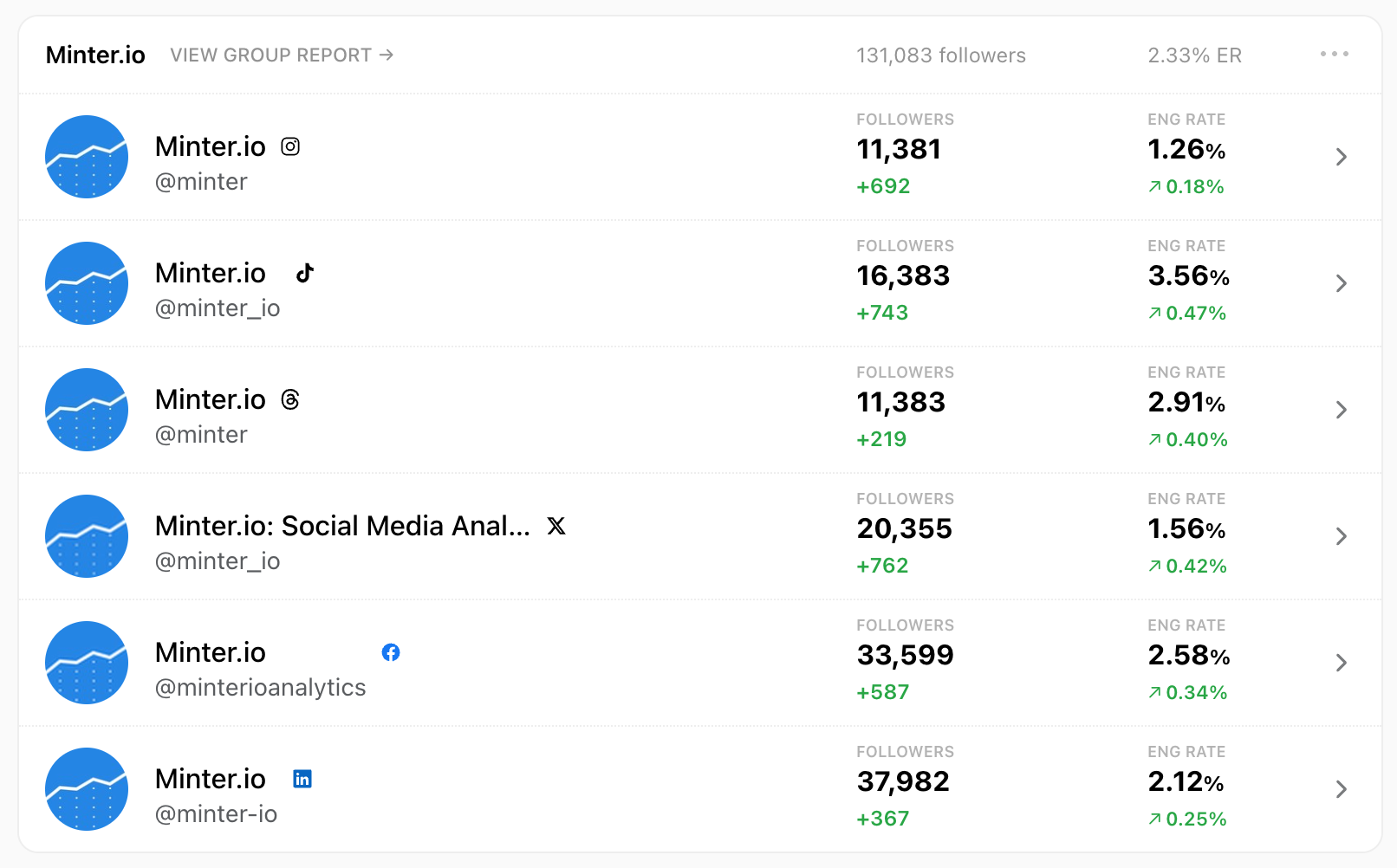
On the Minter.io home page, the group header shows two quick numbers for the whole brand: total followers and overall engagement rate.
Open the group report
Click View group report next to the group name. Each report has three tabs: Overview, Profiles and Posts.
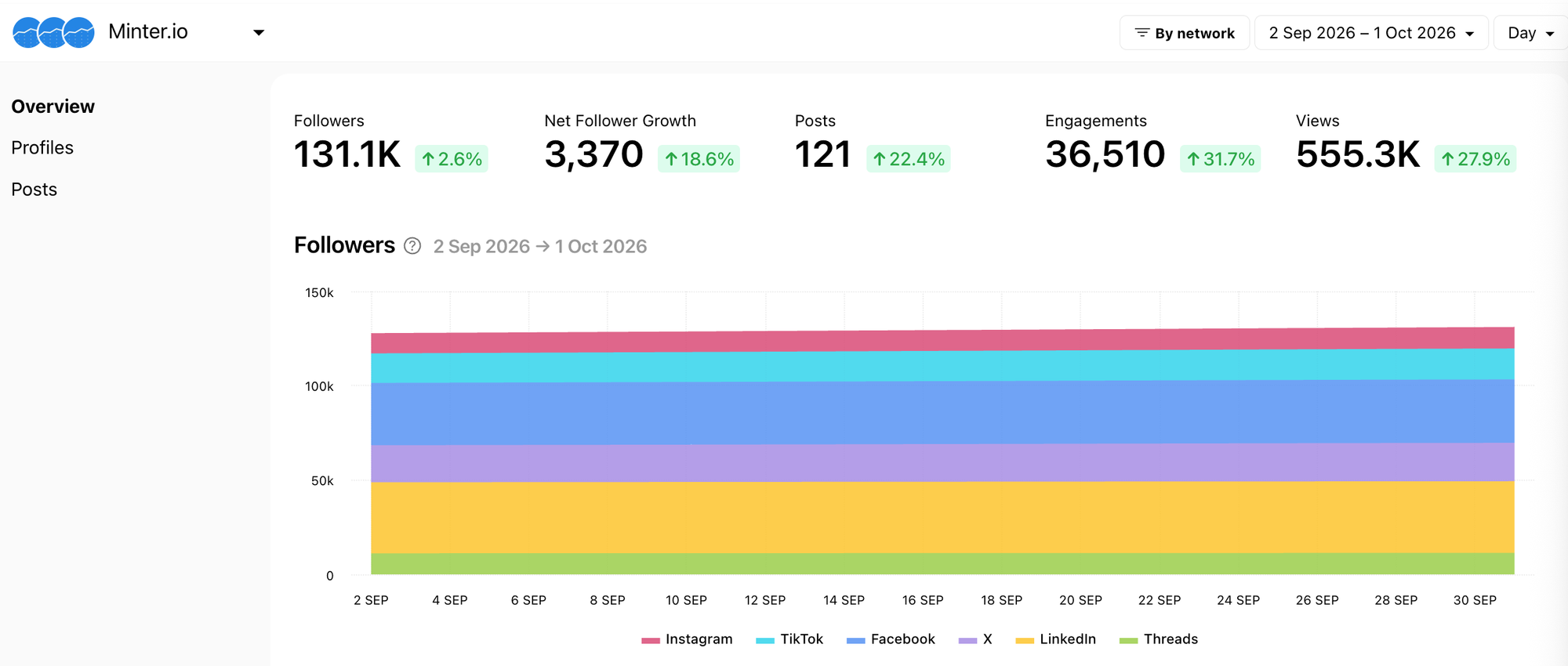
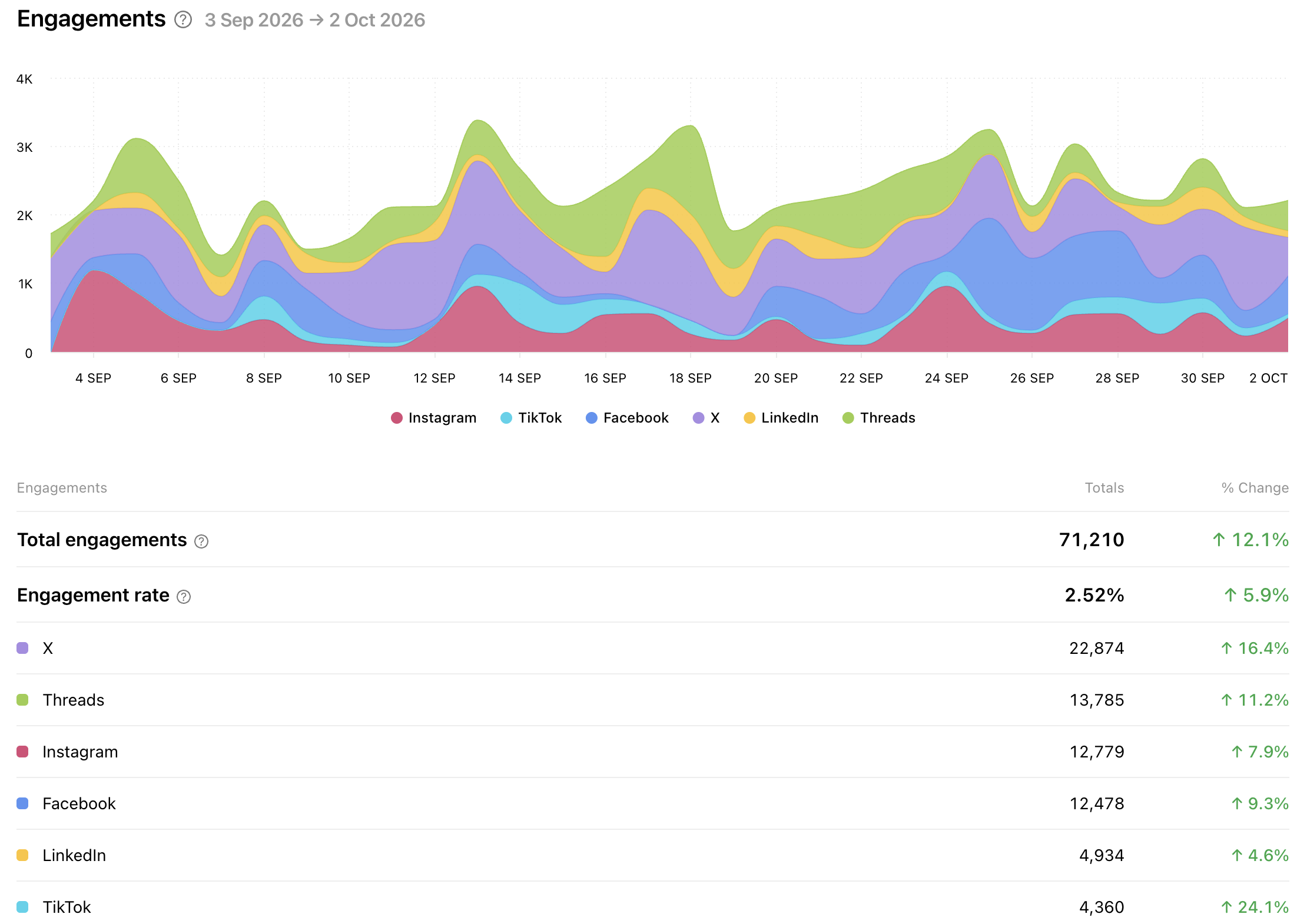
The Overview shows the key metrics for your whole brand: total audience, follower growth, posting activity on each network or profile, engagements and views.
Choose the date range you want to review
Choose any date range in the date picker and the whole report updates to match. Use the last full month for monthly reporting, or a campaign's dates to see its impact across every network. The % change next to each figure in the report compares the selected period with the previous period of the same length.
Compare your results by network or by profile
Use the dropdown at the top of the Overview to choose how results are split:
- By network combines profiles from the same network. Use it to compare channels, such as Instagram against TikTok, and see what each adds to your brand's results.
- By profile shows each account separately. Use it when you run more than one profile on the same network, such as regional Instagram accounts.
How to report on multiple Instagram accounts in one place
A group doesn’t have to span several networks. If you run several accounts on one platform, such as a main brand account and regional or product accounts, put them in one group to see their combined followers, growth and engagement. Switch to By profile to compare them side by side, or open the Posts tab to find the best content across all of them.
Compare accounts in the Profiles tab
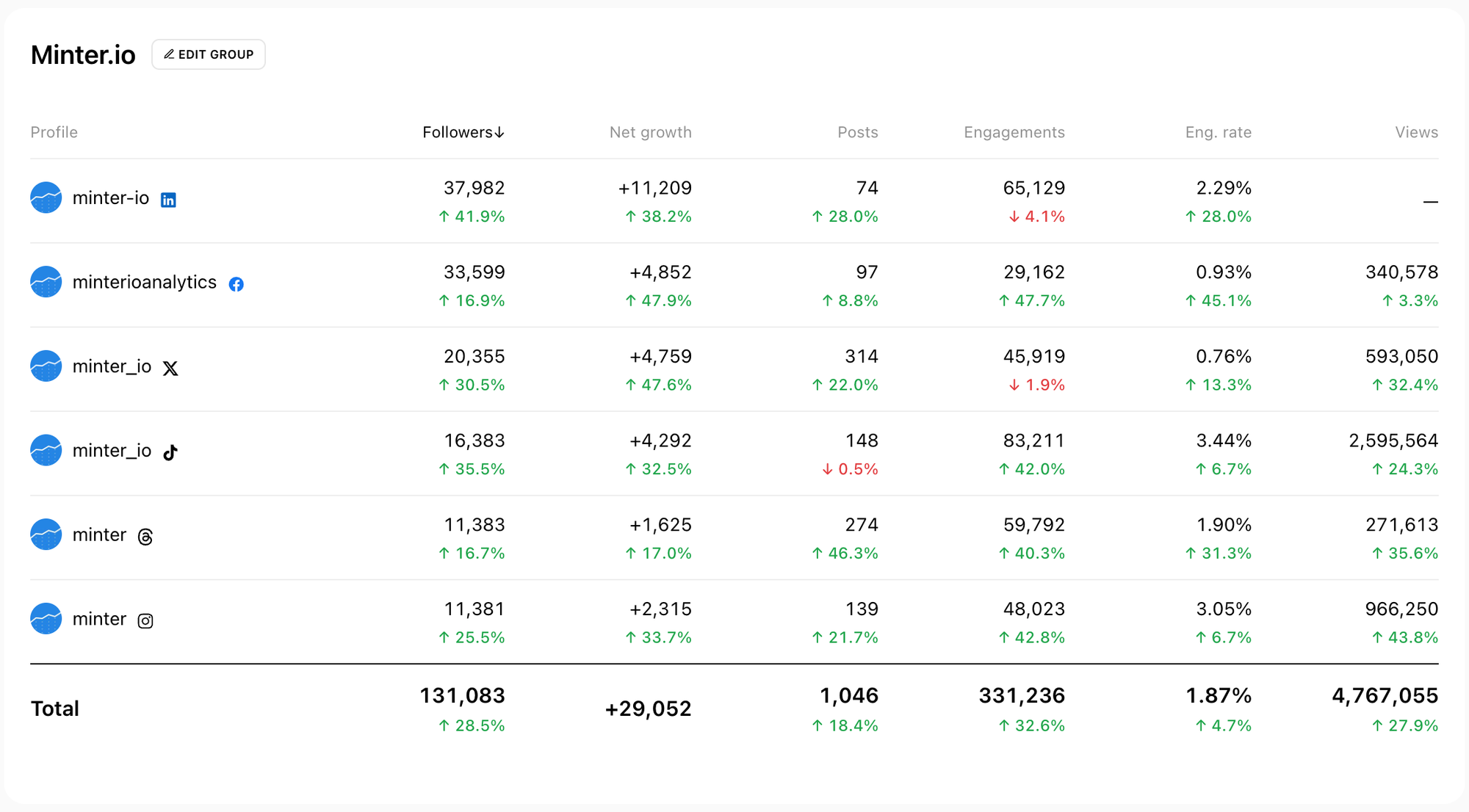
For a side-by-side account comparison, open the Profiles tab of the group report. It puts every profile in the group in one side-by-side table. Sort by any metric to see which account performs best.
Spot channels that need more attention. This is where group reporting becomes especially useful. A headline number gives you a starting point; the account breakdown helps you decide where to investigate.
Find your top content
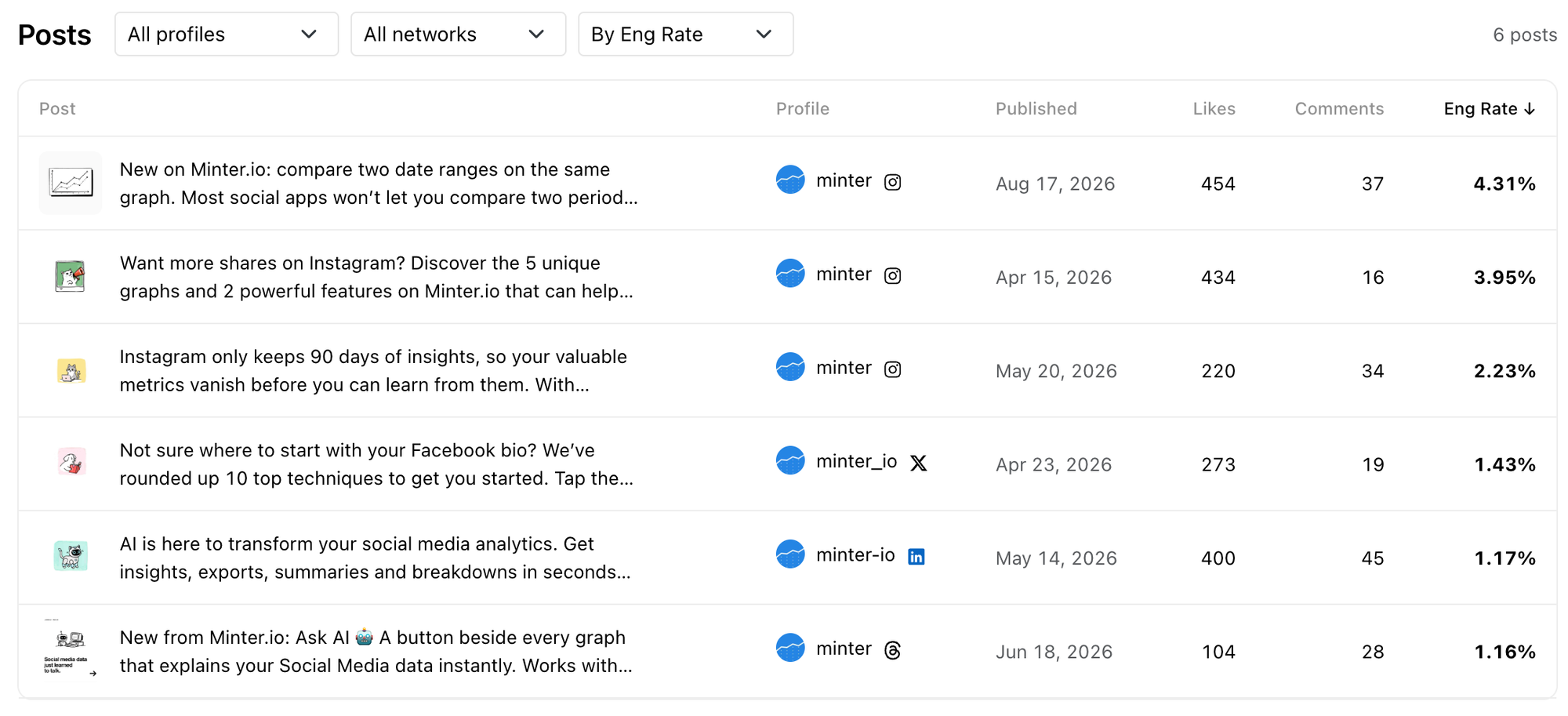
The Posts tab lists every post from every profile in the group. Filter by network or profile, then sort by engagement metrics to find your best-performing content across all channels.
Look for patterns you can test again. Do your strongest posts share a topic, opening hook or creative approach? Could an idea that worked on one channel be adapted for another?
Adjust your groups at any time
If the automatic grouping doesn't match how you manage your brand, you can change it.
To change a group, find it on your Minter.io home page and click its three-dot menu. Choose Edit group name to rename it or Rearrange reports to move profiles between groups, remove a profile or create a new group. Check that the group contains the accounts you want included before reviewing its results. See how to manage groups.
You can also manage the group right in the report: open the Profiles tab and click Edit group next to the group name. Tick or untick profiles to add or remove them.
A group can hold any mix of Instagram, TikTok, Facebook, X, LinkedIn and Threads profiles, including several on the same network. Some ways to set them up:
- One group per brand. The default, and the simplest way to see your whole brand at once.
- One group per market. Put your regional social accounts in separate groups to compare regions.
- One group per client. Agencies can give each client their own cross-platform report.
For more detail, see How to manage groups in Minter.io.
Which social network drives your brand's growth?
The network that drives your growth is the one with the biggest share of your net follower growth and engagements, not the one with the most followers. To find it, open the Overview, switch to By network, and look at Net follower growth and Engagements over the last 30 days or more.
Then check three things:
- Growth against size. A small network gaining fast can matter more than a big one standing still.
- Engagements against posts. Compare Engagements with Content. A network that gets more engagement from fewer posts deserves more of your time.
- What's working. Go to the Posts tab, filter by that network and sort by engagements to see which content drove the results. Ask the AI Analyst which content themes performed best.
If you’re looking for all social media analytics in one place, start with a repeatable review: check the group summary, choose your period, compare networks and investigate the profiles and posts behind the results. Explore multi-account social analytics with Minter.io. Start a 14-day free trial!