
How to benchmark your social media against competitors

Social media numbers make more sense when you have something to compare them with. Is your engagement rate good for an account your size? Are your competitors growing faster than you?
Minter.io’s Benchmarks helps you put your data in context. Compare your performance with similar-sized accounts, then add up to five of your own profiles or competitors to the charts.
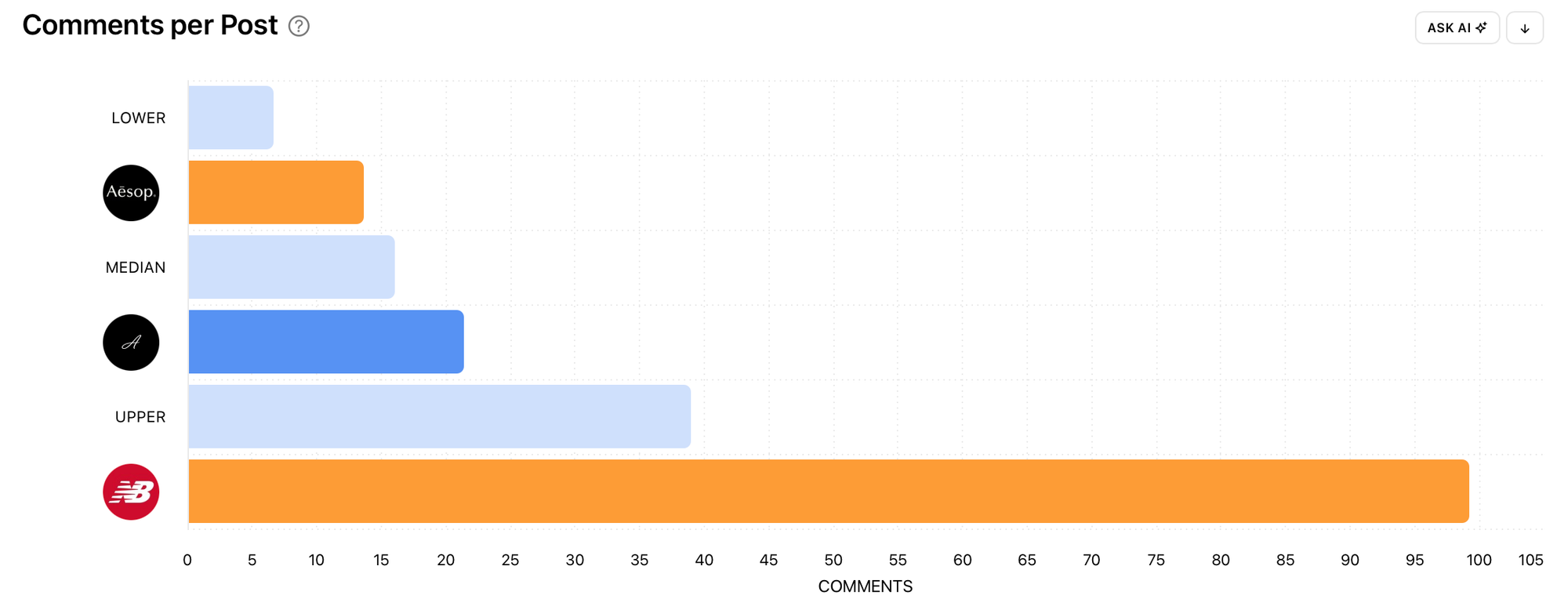
This guide covers how to set it up, which accounts to compare with, how to read the results and what to do next.
How to add competitors to your benchmarks
By default, Minter.io’s Benchmarks compares your social account with accounts of a similar size, but you can add up to five profiles to the charts. To compare with specific profiles, open Benchmarks, choose Add accounts and tick the competitors or your own profiles you want to see. Each selected profile appears as its own bar, making it easier to see how the accounts stack up. (If a competitor isn't in the list yet, add them to Minter.io first.)
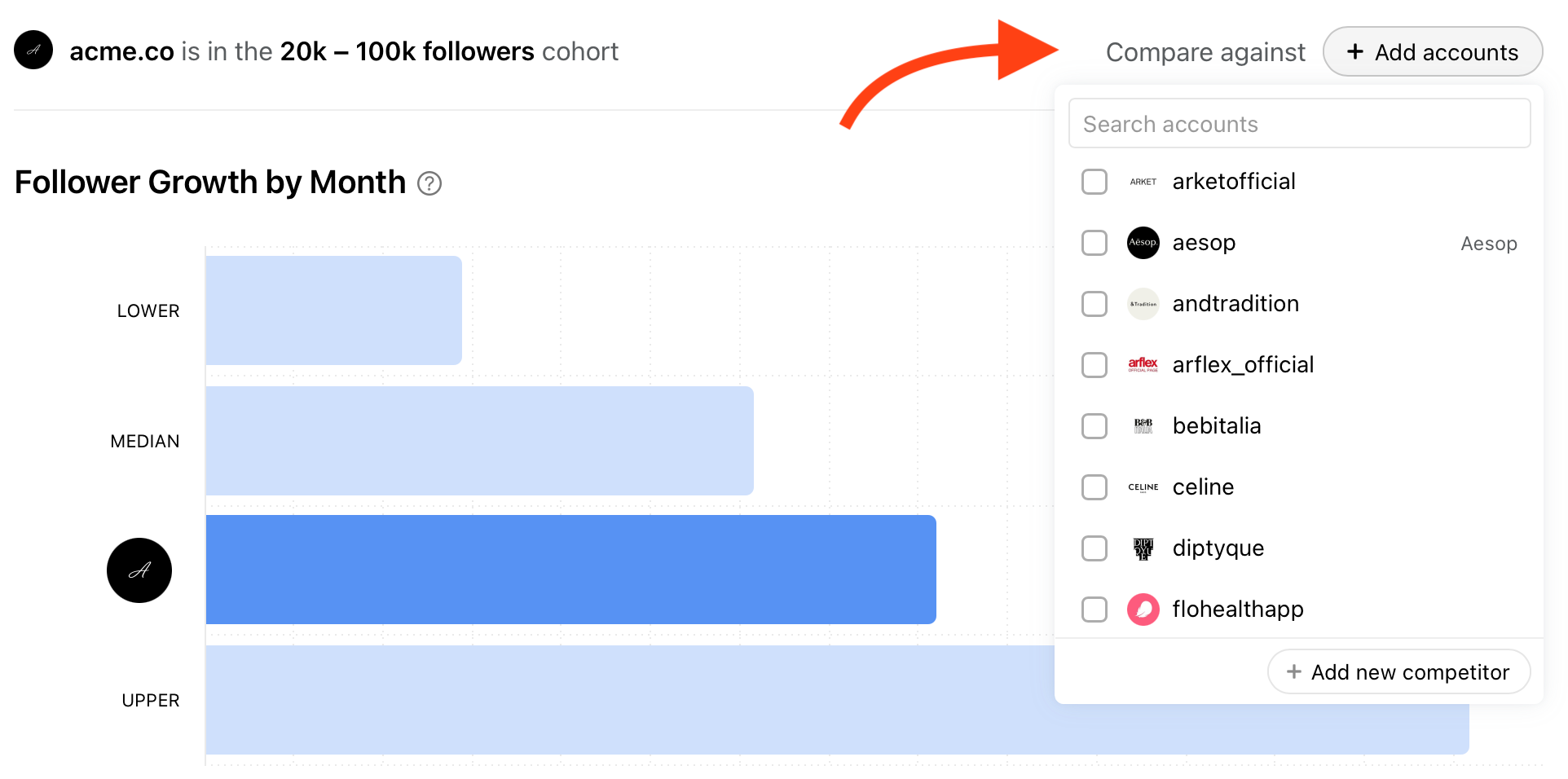
Benchmark across six social networks
You can now use Benchmarks for Instagram, Facebook, TikTok, X, LinkedIn and Threads, bringing benchmark comparisons to more of the social profiles you manage. Choose accounts on the same network and focus on metrics that relate to your goals for that platform.
Which competitors should you benchmark against?
The accounts you choose should reflect what you want to learn.
Compare with your closest competitors
Start with brands that offer similar products or services, target a similar audience or operate in your market. Look for specific differences you can investigate. For example, your account and a competitor publish a similar number of posts, but their posts consistently attract more comments. Take a closer look at the conversations happening around their content. Are they answering common customer questions, inviting opinions or covering topics your own content rarely explores?
Compare with your own accounts
If your brand runs separate profiles for different locations or products, comparing them can help you identify where there’s something to learn internally. One account might be growing faster, while another generates more interaction around its content. Explore the topics, formats and approaches behind each account’s strengths, then consider which could work elsewhere.
Compare with an aspirational account
Add a bigger brand account you want to grow towards. Use Benchmarks to see where the performance gaps lie. Choose one area to investigate. For example, look at how that brand generates discussions. Keep account size in view, particularly when comparing counts such as likes or comments. The cohort benchmarks provide useful context.
How do you know if you're ahead of your competitors?
The cohort range shows what's typical for accounts your size. Competitor bars show who you're actually up against. Read them together:
- You're above the median, but a competitor is well ahead. You're doing fine for your size, but that competitor is ahead on this metric. Review their strongest posts for approaches worth exploring.
- A competitor posts much more often but gets lower engagement per post. Higher posting frequency is giving them presence, not interaction. Matching their posting frequency probably won't help you.
- A competitor gets more comments per post despite posting at a similar frequency. Look at their topics, questions and replies to see how they encourage conversation.
- Everyone is below the median, including you. This is likely a trend in your niche or on the platform, not a problem with your strategy.
- You're ahead on one network and behind on another. Consider your goals, audience and resources on each platform before deciding where to focus.
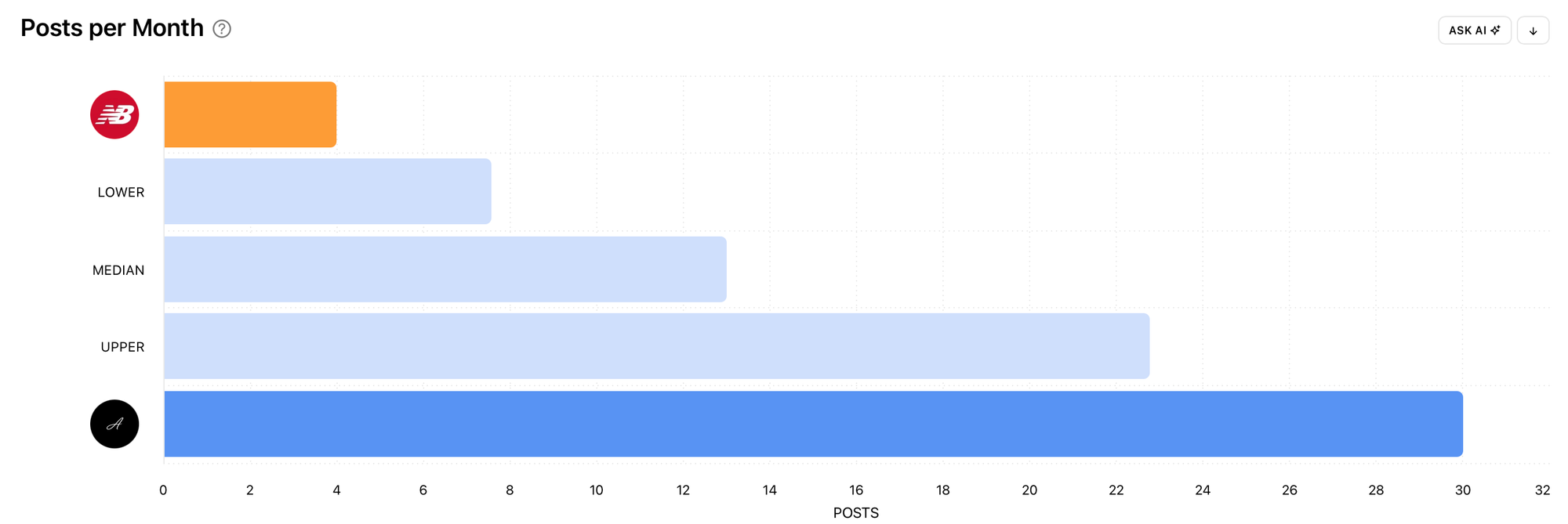
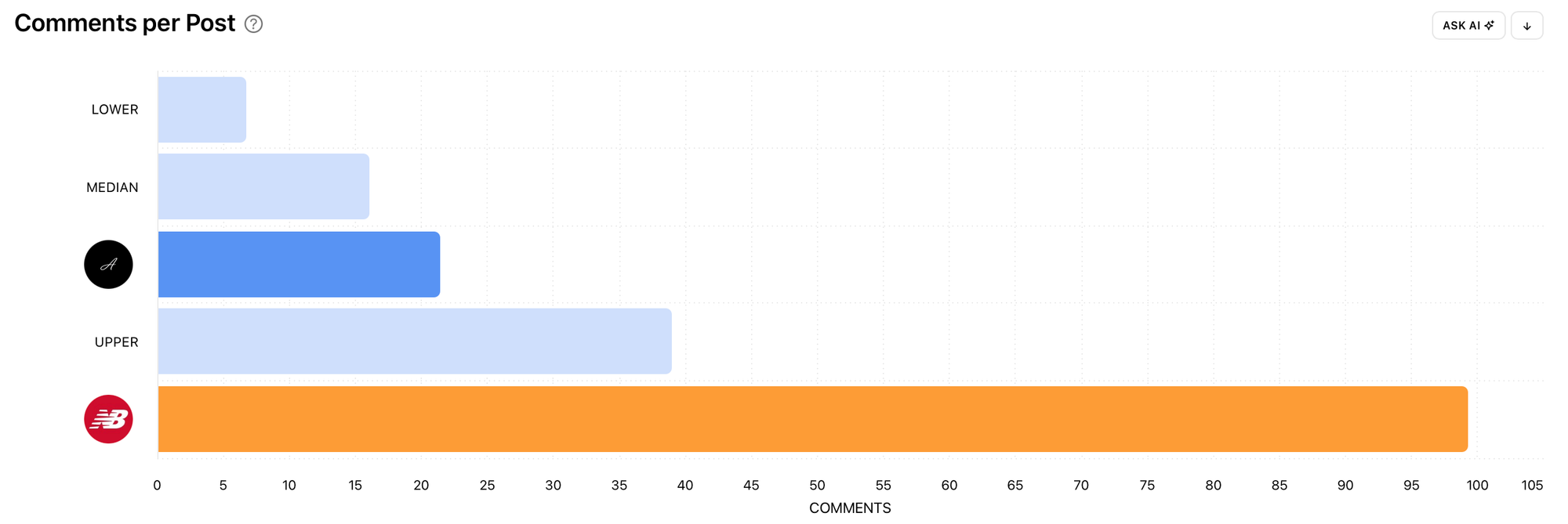
Benchmarks in Minter.io
Benchmarks uses organic data only, so boosted posts won't skew the comparison. The charts use your averages over the last 30 days (follower growth uses your average monthly growth over the last 12 months) and update daily, so you can keep up with changes in your market.
For a detailed metric guide, see How to know if your Instagram numbers are actually good.
Benchmarking for agencies and multi-brand teams
- Add all your client or brand accounts to one chart to spot which one is underperforming for its size.
- In client reports, show progress against chosen competitors, not just against last month. "Ahead of two of three competitors on engagement rate" means more to a client than a percentage change. For reporting tips, see How to build a client-ready social media report.
- Use the same competitor set every month so the comparison stays consistent.
Turn benchmark gaps into next steps
You don’t need to outperform every competitor on every metric to find something useful. Choose a small set of relevant accounts, identify one area you’d like to improve and investigate the content behind the difference. Test one idea at a time with your own audience and review how your results develop.
- Pick the biggest gap against your direct competitors, not every metric.
- Change one thing: posting frequency, format mix, posting time or calls to action.
- Check again after 30 days, once the benchmarks reflect the change.
Dig deeper with AI Analyst
To understand what's behind a gap, open a competitor's report in Minter.io and ask AI Analyst what drove their results:
- How has this account's follower growth changed over the last three months?
- What topics or themes come up most in their top posts?
- What were this account's best posts this month, and what do they have in common?
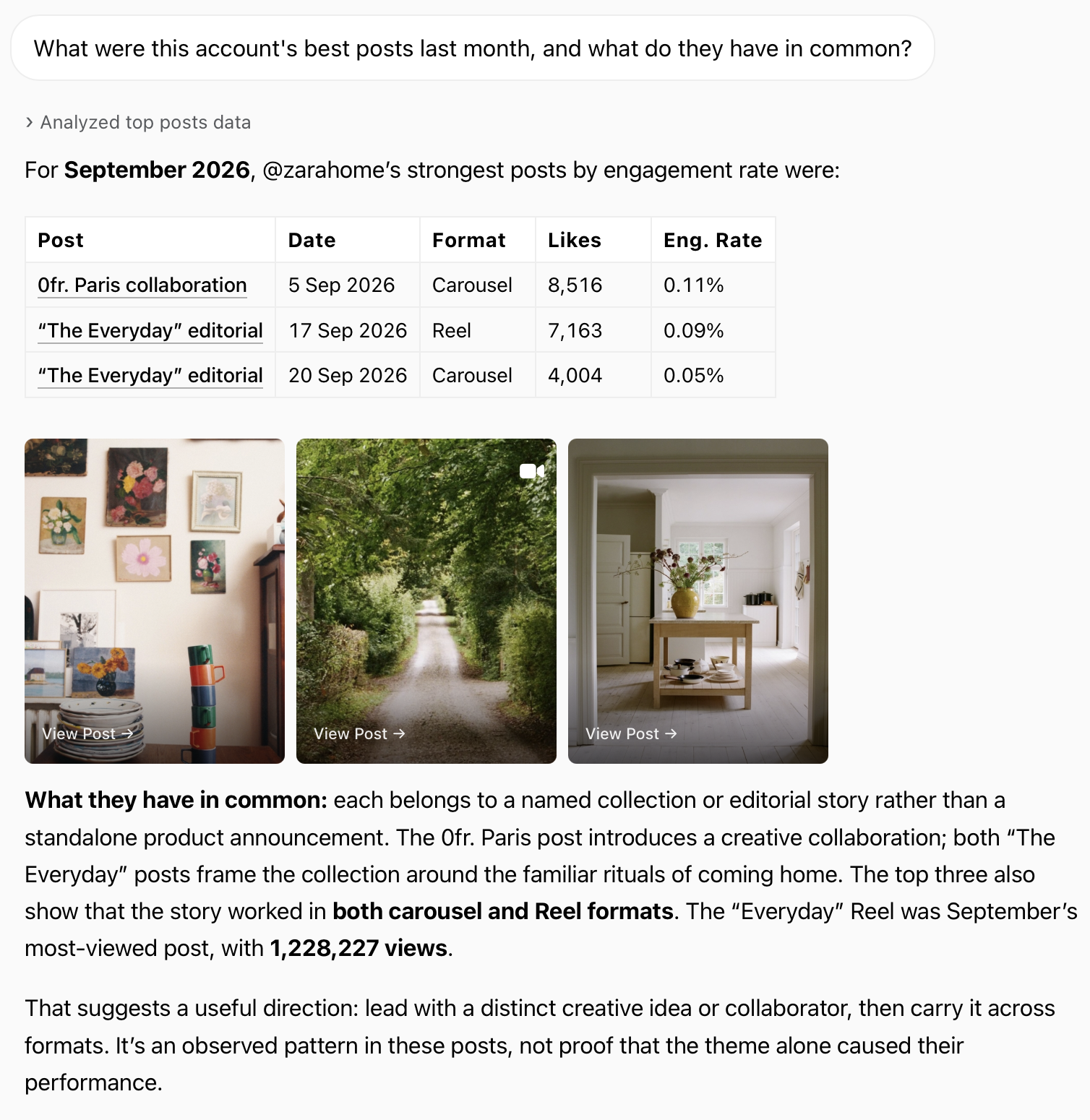
Use Minter.io to compare your accounts with Benchmarks, then explore your next steps with AI Analyst. Try it today!