
How to squeeze the most out of Instagram Reposts with analytics

The Instagram Repost feature is a powerhouse. It utilises the force of your audience to get your content in more places on the app, helping you reach wider audiences, grow your fanbase and see what people care about and want to be associated with. Reposts go beyond likes and comments, and they get your content in front of more people than shares and saves might do.
Instagram’s Repost feature lets users share public reels and posts from other accounts (as well as their own) which are then shared to followers’ feeds, in Reels feeds and directly to a dedicated tab on the user’s own profile - ideal places for posts to get discovered, interacted with and reposted again. When someone reposts a post, they can even add a note to the repost to give thoughts, context or general musings.
Tracking your reposts helps you clock in on content that gets people clicking the Repost button. It helps you understand the types of content that drive reposts which can help you make smart choices to get more reposts on future content. At Minter.io we have vital information available for Reposts on your unique content as well as your competitors.
Let’s look at how you can use this information to your advantage…
Reposts
Head to the Posts section of your Minter.io Instagram data to find the Reposts graph. The Reposts graph shows the number of times posts published during the selected date range were reposted. Data is split into content types, making it simple to spot the post types that were reposted the most on different days. Above the graph is the total amount of reposts, the average number of reposts and the repost amount for each content type. Pull from this section for quick data about reposts on your content within a specific time period. Historical data is available for all posts.
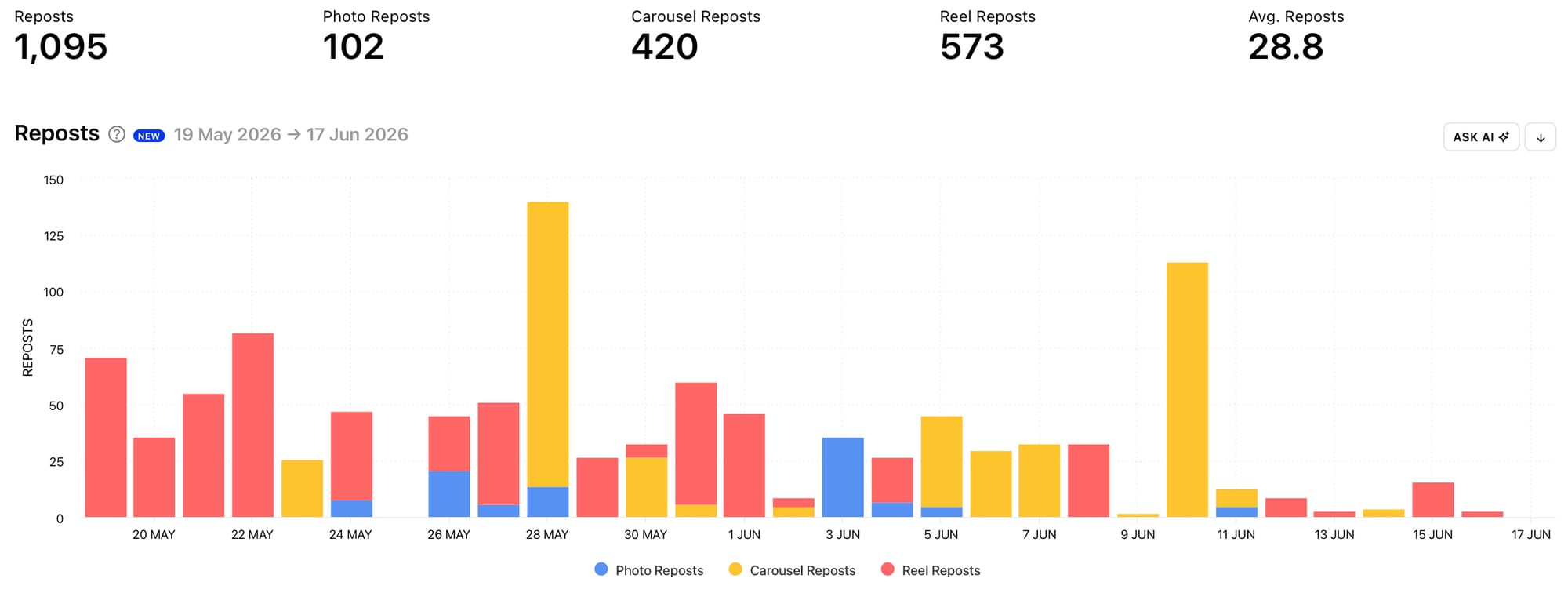
Look at your Reposts graph and consider:
- On which days did your content gain the most reposts?
- What content type was reposted the most?
- Did you publish more of one type of content or did a content type simply outperform the others?
- Are there significant peaks and dips in the data or is it relatively even?
- Which content or other actions may have caused peaks or dips in reposts?
Use the Ask AI button to explain the data and deepen your understanding of your Reposts graph.
Please Note: Reposts data is currently only available for Instagram profiles connected to Minter.io via Facebook.
Sort Posts by Reposts
Now that you’ve taken a look at the general trends in your Reposts data, let’s knuckle down into the content that drove the highest amount of reposts for your profile. Go to the All Posts section of your Instagram Minter.io data and choose to view Posts by Reposts. This will order the posts published within the selected date range from the highest amount of reposts to the lowest.
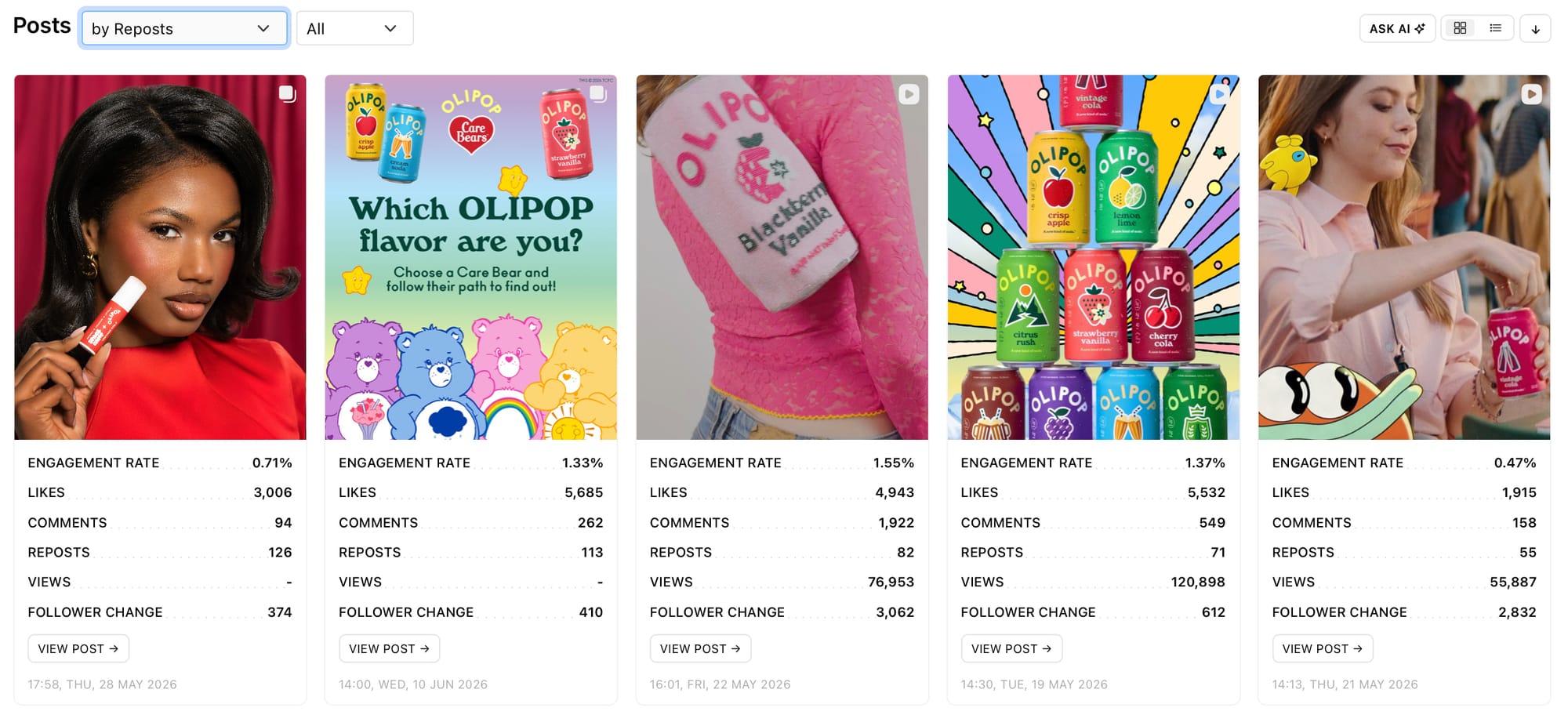
Look at the content that gained the highest amount of reposts and consider the:
- Content Styles
- Hooks
- Text overlays
- Descriptions and captions
- Colour use
- Subject matter
- Topics
- Media choice
- Sounds and songs
- Branding
- Collabs
By determining the elements used in the content with the highest amount of reposts, you can craft new content to encourage a similar amount of reposts.
Competitor Reposts
Expand your inspiration and knowledge by tracking competitor data with Minter.io too. By connecting a competitor’s Instagram account to Minter.io you can get information on a whole host of analytical data, including reposts.
Head to the Posts section of your competitor’s Minter.io Instagram data to find their Reposts graph. The Competitor Reposts graph shows the number of times posts published during the selected date range were reposted. Similarly to your own Reposts graph, it is split into content types and shows the total amount of reposts, the average number of reposts and the repost amount for each content type above the graph. Use this information to see what is working for your competitor.
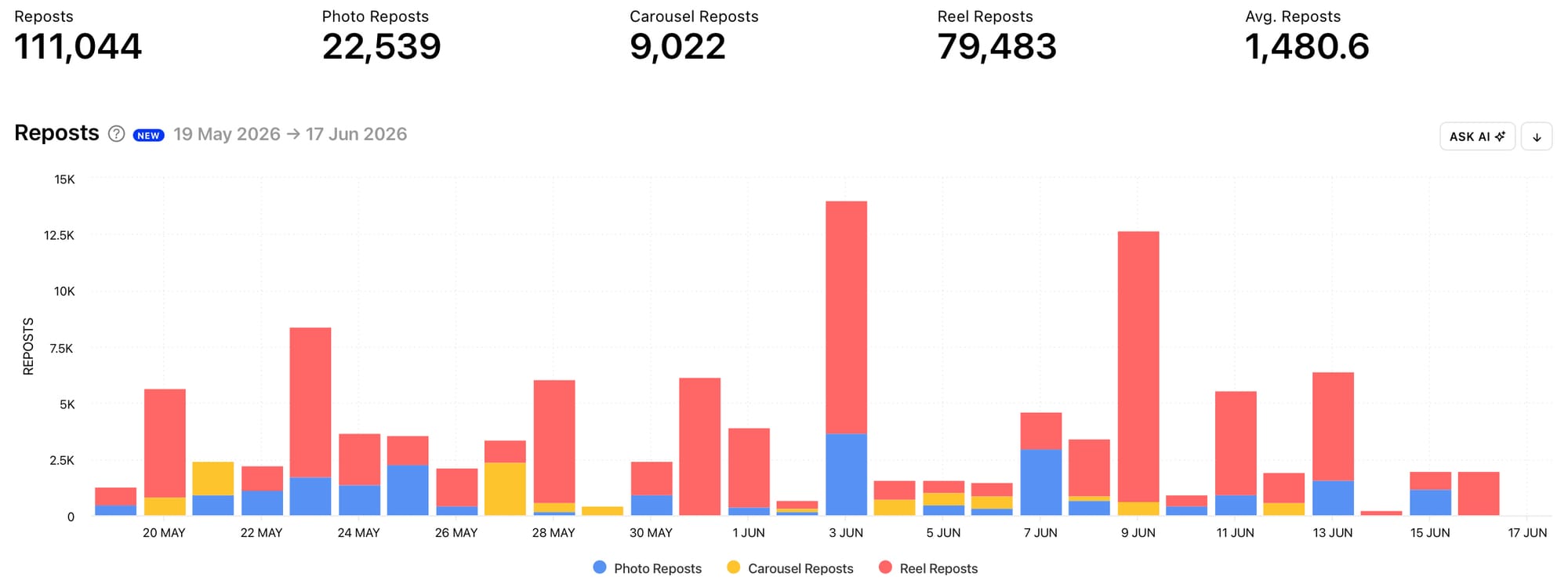
Look at your competitor’s Reposts graph and consider:
- How many reposts did they get?
- What content type gained the highest amount of reposts?
- Did your competitor post more of the top content type or did that content type simply perform better than the others?
- Are there significant peaks and dips in the data or is it relatively steady and consistent?
- What could have caused any peaks and dips?
- Does the Reposts graph data mirror data in other graphs such as likes, comments, shares and saves?
By getting to know and understand Competitor Reposts data, you can get inspiration and ideas to help you gain more reposts on your own content.
Sort Competitor Posts by Reposts
Just as you can sort your own posts by reposts, you can also order your competitor’s posts by reposts. Head to the All Posts section of your Minter.io Competitor Instagram data to do this. By choosing to view Posts by Reposts, all your competitor’s posts published within the selected date range will be shown from the highest amount of reposts to the lowest.
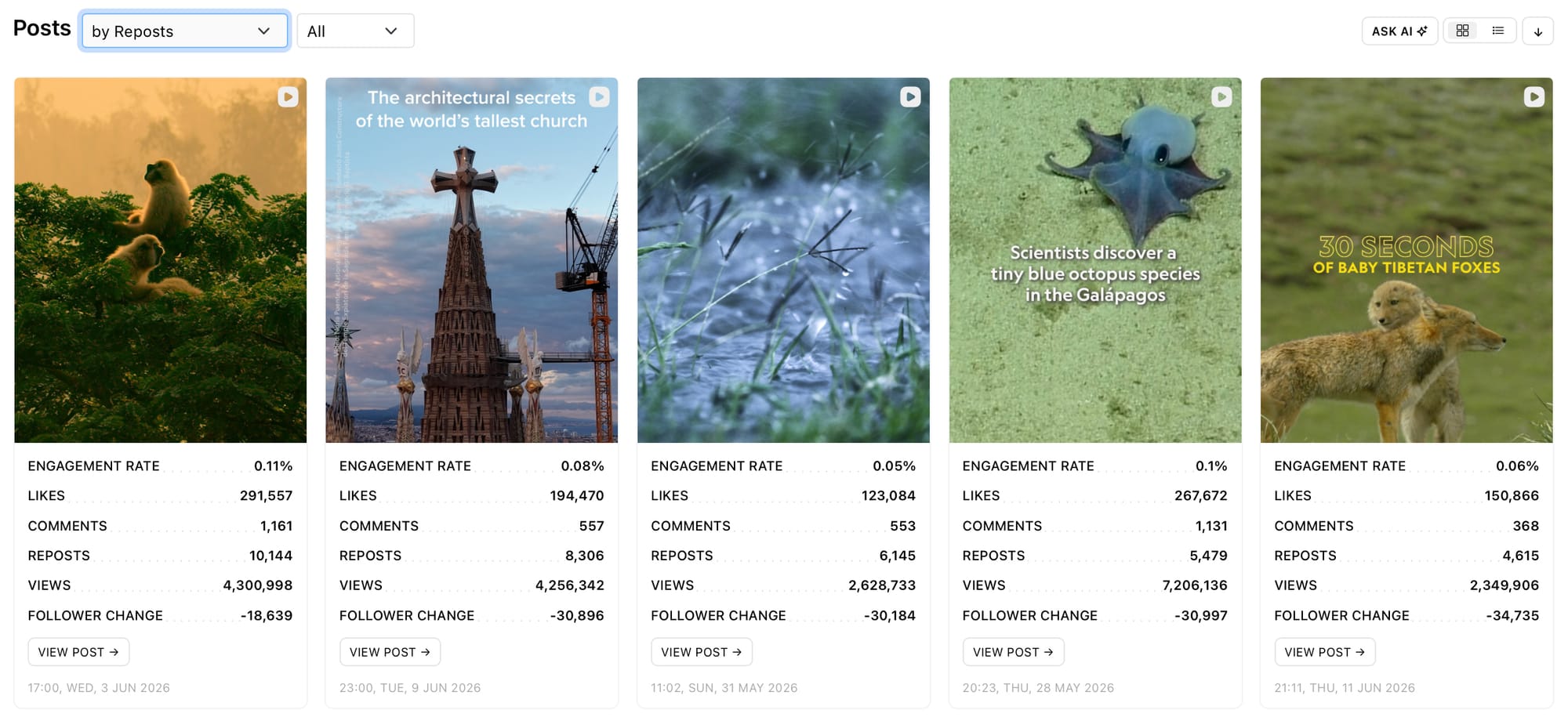
Look at the content that gained the highest amount of reposts and consider the:
- Content Styles
- Hooks
- Text overlays
- Descriptions and captions
- Colour use
- Subject matter
- Topics
- Media choice
- Sounds and songs
- Branding
- Collabs
Use your competitor’s top posts to inspire fresh content for your profile, designed to encourage an elevated amount of reposts.
AI Analyst
For increased understanding and ideas, make use of the Minter.io artificial intelligence tool - AI Analyst. The AI Analyst can help explain your unique data, provide step-by-step plans and improve your approach to social media marketing, all with the speed, efficiency and ease-of-use needed to make effective improvements tailored to you. Simply start with a prompt and let the Minter.io AI Analyst help you on your way to more reposts.
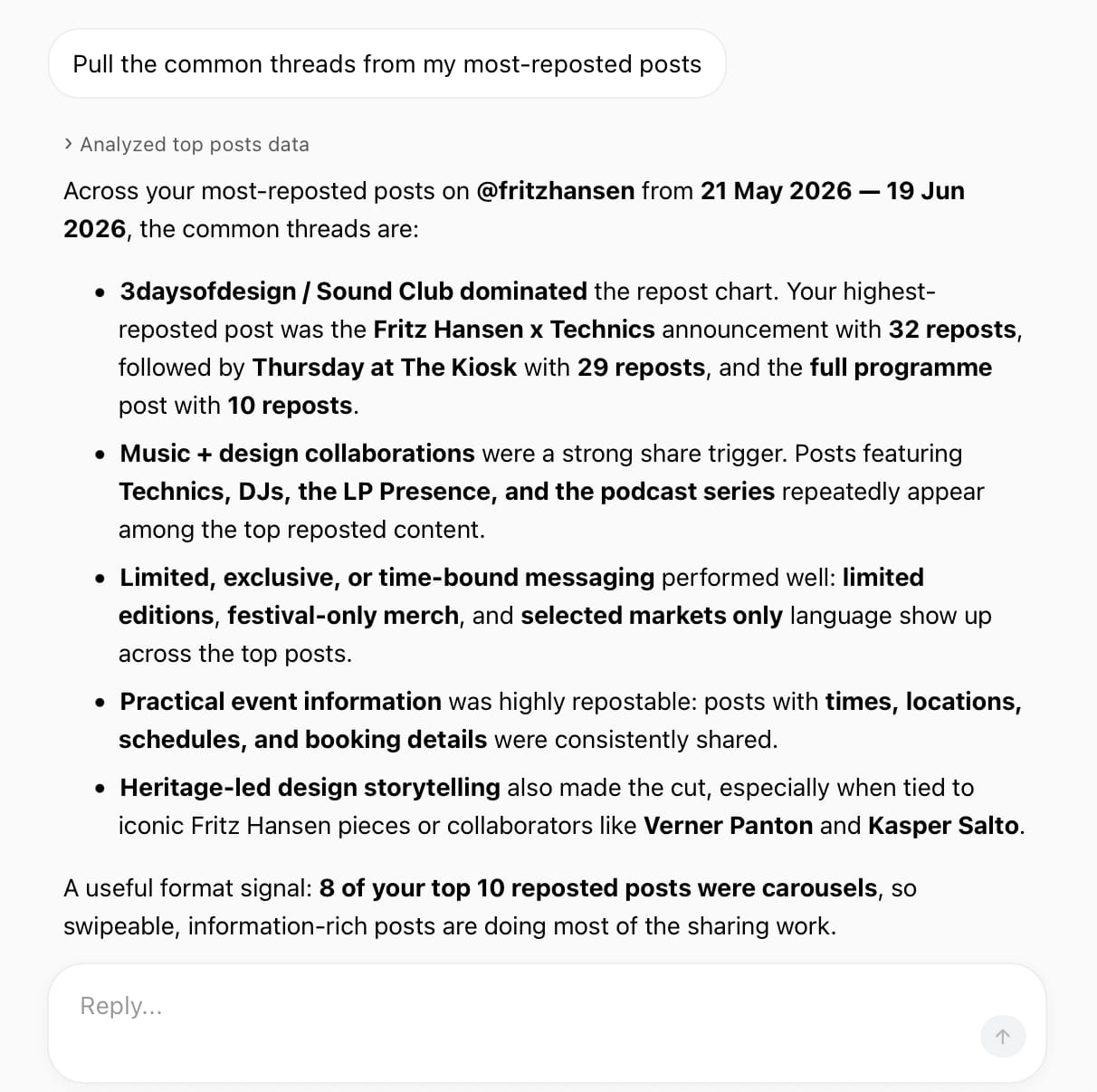
Consider the following prompts to get you started:
- Design my next 3 posts specifically to get more reposts
- How can I get more reposts using Reels?
- What should I stop doing if I want more reposts on my content?
- Write 5 captions to drive more reposts
- How did the reposts this month differ from last month?
Are you ready to get more reposts on your Instagram content? Head to Minter.io now to unlock the graphs and features in this article, as well as social media analytics for TikTok, X, Threads, Facebook and LinkedIn.